Like, subscribe, and comment below.
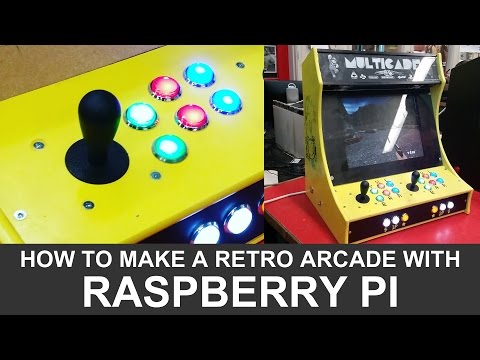
This build log follows the arcade cabinet build including wiring and assembly using an MDF cabinet and a Raspberry Pi 2 and 3.
This is a basic cabinet that doesn’t use vinyl graphics, or T-molding. Those will be used in future builds.
There is still much to be improved with these builds. These are a starter project that still leave much to be customized. If you have cool ideas please let me know in the comments below!
Programming the GPIO buttons to work with RECALBOX:
https://youtu.be/yQRphxYgaMA
All the plans can be downloaded from: http://holbrooktech.weebly.com/pi-arcade-101.html
More explanations and downloadable packages!
Instagram https://www.instagram.com/we_build_stuff/
Recalbox: https://www.recalbox.com
Raspberry Pi operating system – donate to them!
One of my favorite eBay stores: http://stores.ebay.com/sinoarcade
joystick and button sets for $60-$100
My Local suppliers
http://www.rpelectronics.com/
http://leeselectronic.com/en/
Original Cabinet design by http://www.instructables.com/member/rolfebox/
Music:
I dunno by grapes (c) copyright 2008 Licensed under a Creative Commons Attribution (3.0) license. http://dig.ccmixter.org/files/grapes/16626 Ft: J Lang, Morusque
another one by grapes (c) copyright 2009 Licensed under a Creative Commons Attribution (3.0) license. http://dig.ccmixter.org/files/grapes/19168
)
Wish I could make things like this
This is a fantastic video man.
Loved the video ! , is there a way to prevent the balls in the joysticks from "spinning" and prevent them from falling off ?
banana pi open single baord computer : http://www.banana-pi.org/product.html
I'd advise always installing a set of heatsinks on your pi's. Those CPU's tend to overhead when stressed and your system will shut down in the long end 🙂
you are a champ 👍
Noticed how you connect the joystick & buttons onto the GPIO. I did some searching, and the best i'd found was the GPIO pins diagram.
How do you know which input goes where?
Like and New Sub
there is some controls now that encode the exit into a usb connector , so you would not need a lot of that wiring at least on the pi side
Damn, i wish i have the garage space for a table saw like yours. Even with the dust port vacuum, i bet cleaning up the rest of the sawdust is a pain. Good job on the video…….very inspiring.
hican you tell me how you hooked the mini amp up with the Raspberry Pi 3? thank you
Awesome mate, I wish I had the skill to make one!
I bought a pie 3 and am considering making a cabinet like the one you made.Could you do a video for those who do not have the professional tools but sort of basic power tools?
But really good video man!
Cheers
All this work and you fitted it with a shitty LCD…WTF????
Great job. Very detailed and informative.
you should sell these on ebay you would make a nice sum
What size monitor did you use for the build? I am in the middle of using your instructions to build my own…. beautiful job.
how much did this cost in total?
Awesome video and great job. Thank you man. Local RPi store will be happy to see me today lol
very inspiring
Perfeito!!!!
T-nuts are on the wrong side
can use coin accepted
helluva woodshop!! good work
Great stuff!
Do you make for people, I am looking one to support 24 inch monitor?
Трудовик в америке делает "аркадные" автоматы… Трудовик в россии, если бросил пить, то уже хорошо…
Great stuff!
awesome.!!!!how much did you cost to build one.?