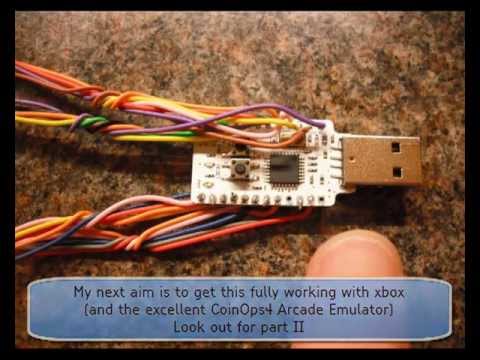
UPDATE: I made some progress which you can follow on my projects site at https://sites.google.com/site/degenatrons/controller-interfaces/usb-keyboard-encoder
I had a go at making my own USB keyboard encoder for interfacing arcade controls on my projects.
I had some success, the encoder is fully working and tested on PC/Mame and installed in one of my cabinets.
My plan was to add screw terminals rather than soldering directly to the board but I got impatient waiting for them to arrive from China.
This is a really inexpensive approach to interfacing controls.
If you’re interesting in building one of these for yourself then you can follow this video.
I developed the encoder on an Atmel AVR board, it is the “Minimus” which is powered by the AT90USB192 chip.
The board has 21 inputs which is more that enough for single player MAME and also sufficient for 2 player MAME with a limited number of buttons.
The boards come with a USB plug so they are easy to connect up and program.
The pins are all numbered and are really easy to solder.
I found a useful reference to the pinouts on this board at www.makestuff.eu/wordpress/?p=2375
The USB socket powers the board (5Volts) and it has a reserved pin for ground.
I set up my program to use 21 pins for input.
These pins can be mapped to various keys and I created some presets for the key mappings.
The default key mapping is for 1 player MAME but this can easily be switched by using a combination of key presses.
The settings are remembered (stored in EEPROM).
Development was done using WINAVR open source development tools in C language.
There are libraries available for USB including LUFA and V-USB and a good community out there.
C code was done, compiled, and a HEX file was generated for uploading to the board as firmware.
HEX was loaded using the Atmel Flip utility.
You can get the hex files and other resources on my project site at https://sites.google.com/site/degenatrons/controller-interfaces/usb-keyboard-encoder/resources-for-usb-keyboard-encoder
This is working great in my PC/Hyperspin arcade cabinet.
Next aim is to get this fully working on an original Xbox and to use in my CoinOps4 arcade cabinet project.
Thanks for watching.
p.s. Check out the full beatboxing flute version of mario at www.youtube.com/watch?v=crfrKqFp0Zg
)
Some questions:
1) Does this device work as a normal usb keyboard? Is it recognized as an usb keyboard by the OS?
2) Is this enconder compatible with linux?
3) Can you make one with 27 inputs?
4) do you sell it? Can you ship it to brazil? How much does it cost?
I will use it for my NO-MIDI organ pedalboard for my virtual pipeorgan (a midi board is too expensive, it is much easer and cheap map the pedal wires to keyboard keys, and use a "virtual midi keyboard program", so we can avoid the mid paraphernalia, but with a normal usb keyboard chip i can get only 20 keys, i guess, and i need 27)
You don't really need jukebox you know, you could get a windows xp pc and just upload a copy of or list of emu files and games and just do it that way then take apart an old keybourd and wireing it to the listed buttons you would be useing so it will play than take a mortal kombat or street fighter arcade stick and wire it to the keybourd buttons that you have selected to wire its as easy as that u could do the same thing with a controller to a n64 and ps1 even a sega genesis nes and snes thanks
So where csn I get one and for how$$$$
so can I used this chip to replace my pckeyboard,im using a jukebox program and I using my numeric keyboardDo .you think it will work??
Just found out about this project and have programmed my minimus. Amazing work, thanks so much for this.
Do you think I could use the Sparkfun AVR Stick as the controller interface for a MAME cabinet? Thanks.
nyc work on KADE. How much would u sell it?
Sorry for the delay in replying. I have emailed you the firmware. You should also take a look at KADE. I just posted a video about the latest encoder project i'm working on. When this is released you can use our software to program and customise your AVR.
I cant download your firmware it always give me error. I already cleared cache but no luck. Can you send me tru email? guardianp@yahoo.com
BTW, I am using Minimus AVR USB V1. (Not the 32k version at the moment).
where can i buy one??????????
Hey, no worries man. I will create a custom mapping for you to fit with your control panel. So you have 20 inputs. 4 + 4 + 1 + 1 per player. I will email you an updated firmware for the device and some instructions on how to flash it with the new program.
I got your email so will respond to that.
Hi, Firmware update to v1.3 has your requested keymappings and you can see the updated keymappings on my project site. Link at top of description. Head to the resources page. Many thanks for this. It is a great feature.
OK great. Check that email, there should be annex new pinout.txt file. In that I wrote the suitable changes. If You want I can send You HW wiring to be able to use 1 MINIMUS for both players (4xdirections, 6xButtons, Start, Coin) x 2.
You have the old source. I just read your email and will need you to clarify what changes you would like me to make. No problem doing this for you.
I read all the source code You wrote for it, but don´t know where and how to change it ofr more suitable mapping.
I don´t know too if You are busy because You didn´t answer on email. 🙂
I sent You new mappings. With it You can use 1 MINIMUS for both players 4+6 buttons. START and COIN can be HW setup as PLAYER UP+DOWN – because in real they cannot be normally pushed in one moment.
I use this type saving buttons when I don´t have enought inputs from other devices.
Check that you have the latest firmware loaded. This is tested and working on a bunch of devices. See link at top of description and follow the resources link.
If you want any specific changes, let me know and I will tweak for you. If I think they would be useful for others then I would change the standard mapping or create a new mode.